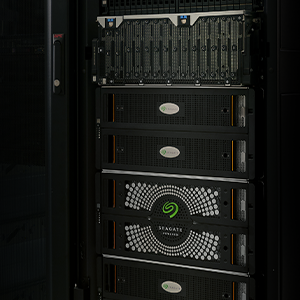
The 8-Bay Rackmount NAS device has several different LED groups.
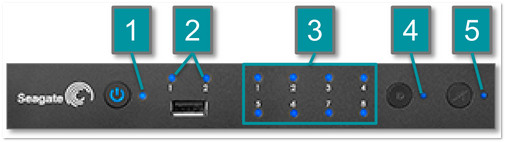
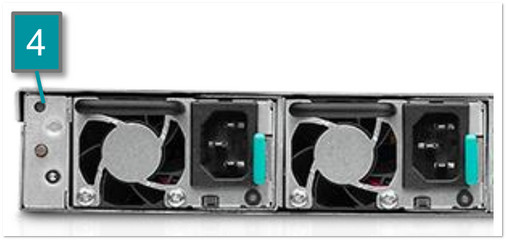
Following are tables explaining the various behaviors of these LEDs:
| 1 - Status LED | 2 - Ethernet LED |
| Color | State | | Solid blue | Ready | | Blinking blue | Startup; shutdown; activity | | Blinking red and blue | RAID synchronization; software update | | Blinking red | Warning | | Solid red | Error | | Solid purple | Updating hardware | | Blinking purple | Communication has been lost |
|
| Color | State | | Solid blue | The respective Ethernet port is connected
to the Internet. | | Blinking blue | Activity on the respective Ethernet port. | | Off | The respective Ethernet port is
not connected to the network. |
|
| 3 - Disk LEDs |
| Status LED | Disk LEDs | State |
| Blinking blue | Blinking blue for working disk(s) (until they are fully initialized) | Occurs as the device is booting and will cease once the drives are fully initialized. |
| Solid blue | Blinking blue for working disk(s) | Drive(s) working (ie, reading and/or writing) |
| Blinking blue/red | Blinking blue/red | RAID synchronizing and will cease once the operation is finished. |
| Blinking blue for working disk(s) | NAS OS update in progress. |
| Blinking red | Solid red for non-functional disks | RAID is degraded. Data remains intact but the array is no longer protected should another disk fail. |
| Blinking blue LED for all disks | Temperature alert (first-level warning) |
| Fans are not spinning |
| A power supply has been cut but power is provided by the second power supply and/or the UPS. |
| Solid red | Blinking blue for working disk(s) | Temperature alert (critical level). The product will shut off due to the high temperature. |
| The power supplies are not providing power and, if applicable, the UPS has run out of reserve power. The product will shut off. |
| Solid red for non-functional disk(s) | RAID has failed and all data has been lost. |
| Not illuminated on disk slots inside the chassis | A disk has not been firmly plugged into the slot's SATA connection or the disk is not receiving power. |
| Solid purple | Solid blue | Updating hardware |
| Blinking purple | Solid blue | Communication has been lost. |
| 4 - Identification LED | 5 - Mute LED |
| Color | State | | Blinking amber | An Identification button has been pushed (front, rear, or NAS OS).
A corresponding LED in the rear of the NAS will blink to identify
the unit in a rack. | | Off | The Identification feature is off. |
|
| Color | State | | Solid amber | The Mute button has been pushed to turn off an audible alarm or to stop the unit from sounding an audible alert. | | Off | The Mute feature is off.
Alert sounds are permitted. |
|