




Discussion of and instructions for updating your computer to be able to use the entire capacity of your larger-than-2 TB internal drive in Windows.
Besides the CPU, many computer systems use special Intel chipsets that handle the I/O from the disc drives. Depending on your system hardware, Windows operating systems may be using Intel device Rapid Storage Technology (RST) drivers which are common. Alternative Microsoft Windows drivers are also commonly used.
Like other kinds of software, the Intel RST drivers are updated to keep pace with new technology. The Intel drivers found in retail releases of Windows 7 have a 2.2 TB limitation. Rather than cut off the capacity at 2.2TB, the limitation expresses itself as the remainder above 2.2 TB. In other words, the driver causes the Windows operating to see a 3 TB drive as 746.52 GiB (or 800 GB).
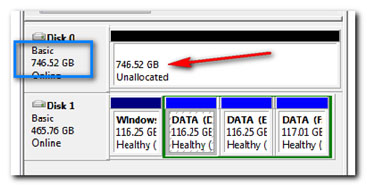
If this is the case, then updating the driver should allow Windows to detect the drive as 3 TB.
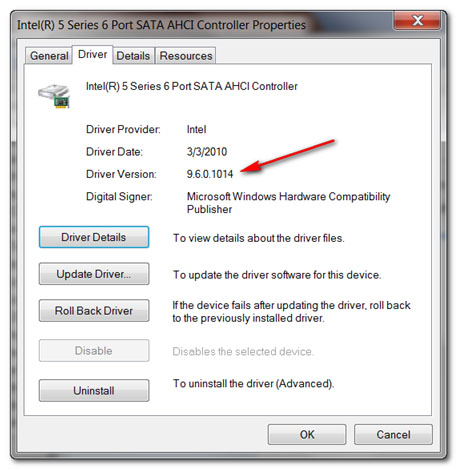
For disk drives beyond 2.2 TB, the proper level of Intel RST driver should be v10.1 or higher. If your system uses an earlier version you can update the driver by following the update instruction on the Intel RST support website. The Intel support website has tools that automatically check Intel device drivers.
You can check manually to see which disk drivers your system uses.
- Right-click on Computer.
- Select Manage.
- Select the Device Manager from the list on the left.
- Expand the IDE ATA/ATAPI Controllers branch of the system tree.
- Double-click on the Intel SATA Controller line.
For example:
 Product support for disk drives greater than 2.2 TB is rapidly evolving. Please contact your suppliers directly for the latest status and capacity support limitations of their products. If you find that any part of this information is out of date or lacking, please let us know so that we may correct it and better serve future readers.


