Was this content helpful?
How could we make this article more helpful?
System LEDs
The Seagate NAS 2 | 4Bay | Bay features two sets of LEDs that provide information on the system status. Review the illustrations below for the LED locations on the chassis.
Status and drive LEDs
NAS 2Bay LEDs
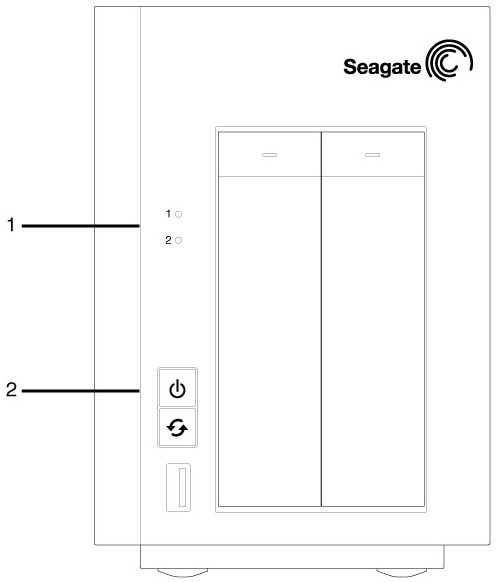
- Hard drives
- Status (power button)
NAS 4Bay LEDs
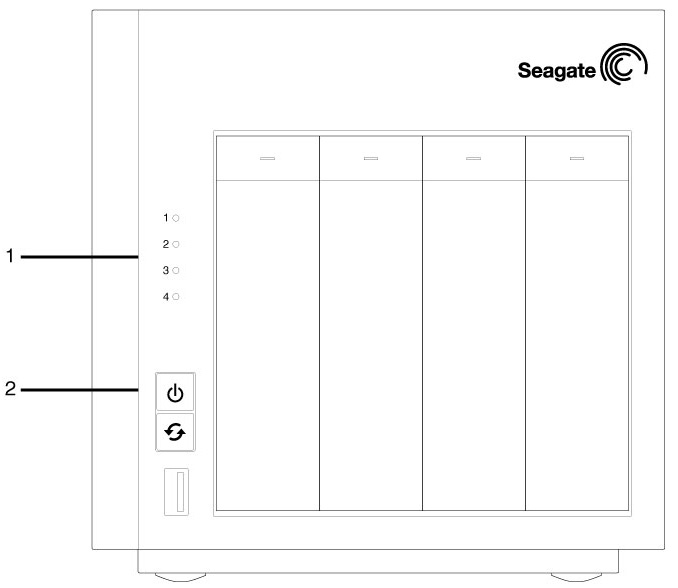
- Hard drives
- Status (power button)
LED behaviour
The list of colours below will help you identify the general status of your NAS:
| Colour | County |
|---|---|
| Solid white | Ready |
| Blinking white | Startup; shutdown; activity |
| Alternating red and white | RAID synchronisation; software update |
| Blinking red | Warning or notice |
| Solid red | Error |
LED indications
The status and hard drive LEDs work together to provide up-to-date details on your NAS's health.
General use
| Status LED | Hard drive LED | County |
|---|---|---|
| Blinking white | Blinking white | The device is booting and will turn solid white; the device is shutting down. |
| Solid white | Solid white | The NAS is ready. |
| Solid white | Blinking white | Hard drive activity. |
| Off | Off | The device is off; fans are not spinning; the power supply has been cut and a UPS is providing power; the power supply is not providing power and, if applicable, the UPS has run out of reserve power. |
RAID and NAS OS
| Status LED | Hard drive LED | County |
|---|---|---|
| Alternating red and white | Alternating red and white | RAID synchronisation; NAS OS update in progress; volume check is pending or in progress. |
| Blinking red | Solid or blinking white | RAID is degraded. Data remains intact but the array is no longer protected should another disk fail; preparing to synchronise the RAID. |
| Blinking red | Alternating red and white on a single hard drive LED | RAID is synchronising with a replacement hard drive. The behaviour will change to alternating red and white for all LEDs. |
| Solid red | Solid white | File system check failed; failed RAID and all data has been lost. |
Temperature
| Status LED | Hard drive LED | County |
|---|---|---|
| Blinking red and off | Solid or blinking white | Temperature is high. Check the environment temperature and the ventilation. |
| Solid red | Solid or blinking white | Temperature is critical. The product will shut off due to the high temperature. |
UPS
Review the LED behaviour below if your Seagate NAS is connected to a UPS.
| Status LED | Hard drive LED | County |
|---|---|---|
| Blinking red and off | Solid or blinking white | UPS battery error. |
| Solid red | Solid or blinking white | UPS critical error or it is not available. |