Was this content helpful?
How could we make this article more helpful?
Operation
Power on
Before powering on LaCie 8big Pro5, confirm the following:
- All hard drive drawers are firmly seated in their bays.
- 8big Pro5's host port is connected to a compatible port on your computer.
- The power cable is connected to a powered outlet.
When 8big Pro5 meets the conditions above, turn the power switch to the on position.
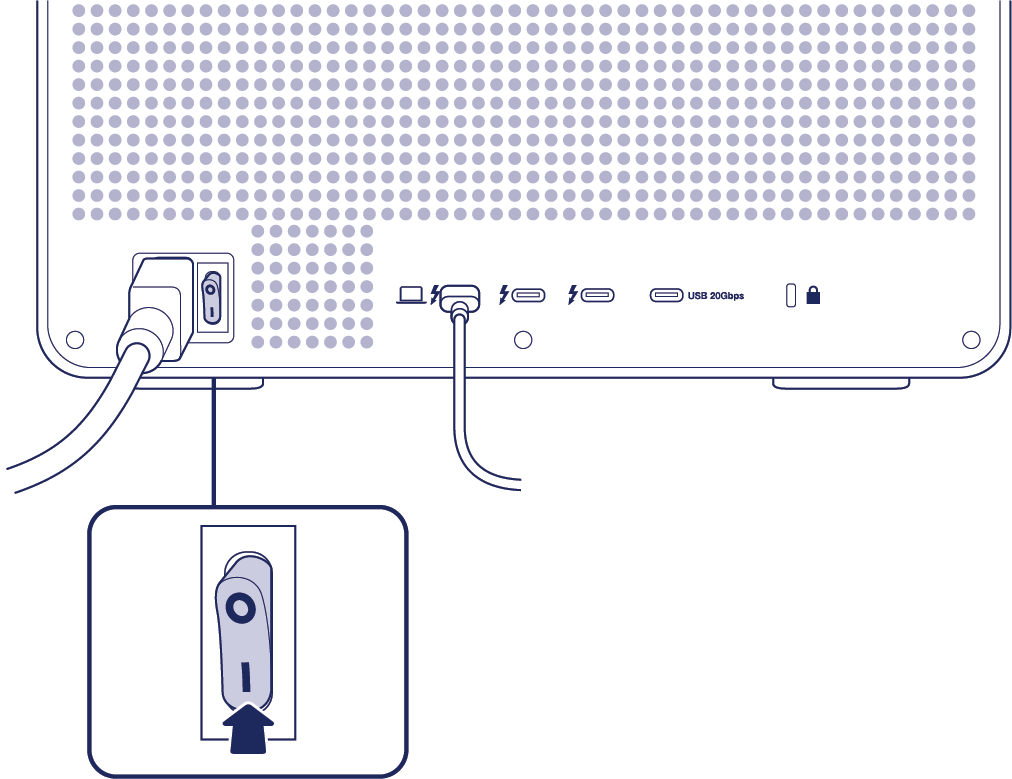
The drive status LEDs blink blue while the disks spin up. You can start using the storage once all LEDs are solid blue.
Safely eject 8big Pro5 volumes from your computer
Always safely eject 8big Pro5 from your computer before powering down or physically disconnecting it. Your computer must perform filing and housekeeping operations before 8big Pro5 is removed. If you unplug the drive without using the operating system’s software, your files can become corrupt or damaged.
Windows
Use the Safely Remove tool to eject a device.
- Click the Safely Remove Hardware icon in your Windows System Tray to view the devices you can eject.
- If you don’t see the Safely Remove Hardware icon, click the Show hidden icons arrow in the system tray to display all icons in the notification area.
- In the list of devices, choose the device you want to eject. Windows displays a notification when it is safe to remove the device.
- Disconnect 8big Pro5 from the computer.
Mac
There are several ways you can eject your device from a Mac. See below for two options.
Eject via Finder window
- Open a Finder window.
- Using the sidebar, click Locations and find the drive you want to eject. Click the eject symbol to the right of the drive name.
- Once the device disappears from the sidebar or the Finder window closes, you can disconnect 8big Pro5 from the computer
Eject via Desktop
- Select the desktop icon for your device and drag it to the Trash icon.
- When the device icon is no longer visible on your desktop, you can physically disconnect 8big Pro5 from the computer.
Disconnecting 8big Pro5 from the host computer during operation
Normal operation
Disconnecting 8big Pro5 from the host computer during normal operation can result in data loss. Always safely eject 8big Pro5 from your computer before powering down or physically disconnecting it.
Foreground initialisation
When starting a foreground initialisation, LaCie RAID Manager will prompt you to disconnect 8big Pro5 from the host computer. Foreground initialisations can only be performed when 8big Pro5 is no longer connected to the host. Reconnecting 8big Pro5 to the host computer while the foreground initialisation is running will cancel the initialisation sequence. In addition, make certain that 8big Pro5 is connected to a secure power supply during a foreground initialisation. Losing power during a foreground initialisation will require a fresh restart of the initialisation process.
Background initialisation
During a background initialisation, 8big Pro5 can be safely ejected from the host computer and continues initialising as long as the device is powered on. It may also be disconnected and reconnected to the host while a background initialisation is in progress. If the device is powered off during a background initialisation, the process resumes from where it left off when power is restored.
Power off
Make certain that 8big Pro5 is not in use and that there are no active transfers.
- Safely eject 8big Pro5 volumes from your computer.
- Turn the power switch OFF.
It is now safe to disconnect the power cord and Thunderbolt cable from the device.
Heat management
To reduce noise during operation, 8big Pro5 uses two cooling fans to pull heat away from the internal components. The cooling fans are temperature controlled, which guarantees optimal heat management by adjusting the rotational speed for the environment. Additionally, 8big Pro5's enclosure dissipates heat from the hard drives to prolong their life. Since the enclosure draws heat away from the internal hard drives, it may be warm to the touch after extended use.
Position and stacking
Always place 8big Pro5 on a flat, stable surface that supports proper airflow and heat dissipation. The enclosure is designed to operate only when resting on its rubber feet.
- Do not operate 8big Pro5 vertically. Vertical positioning is not supported under any circumstances. Placing the enclosure on its side will damage the device and the installed hard drives.
- Supported stacking is limited to two units. You may stack one 8big Pro5 on top of another (a maximum of two units). Stacking more than two enclosures is not supported and can increase the risk of instability or device damage.
- Do not place heavy equipment on top of 8big Pro5. Avoid stacking heavy equipment on top of 8big Pro5.