Was this content helpful?
How could we make this article more helpful?
Support
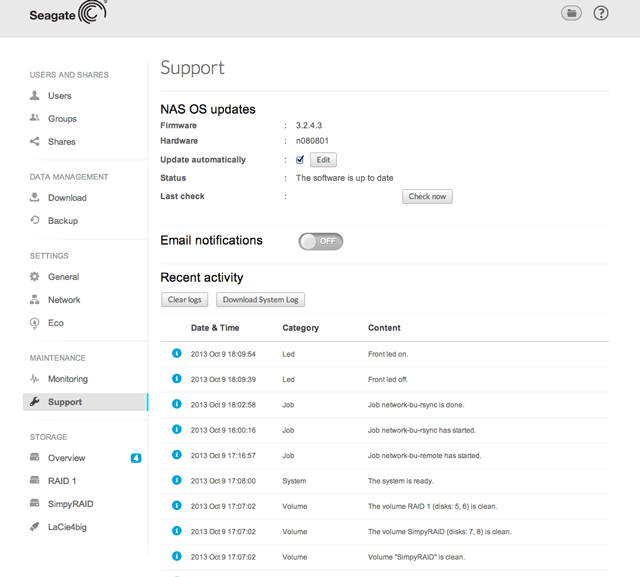
Use the Support page to manage:
- NAS OS firmware updates
- Email notifications
- Logs
NAS OS updates
- Firmware: The version of NAS OS.
- Hardware: The version of your hardware.
- Update automatically: This option is checked by default.
- Choose Edit to change the frequency that NAS OS searches for an update. NOTE: The NAS must have access to the Internet to check for updates.
- Uncheck the box to deselect automatic updates.
- Status: Refer to Status to see if a NAS OS firmware update is available.
- Last check: The date and time of the last search for a NAS OS firmware.
Email notifications
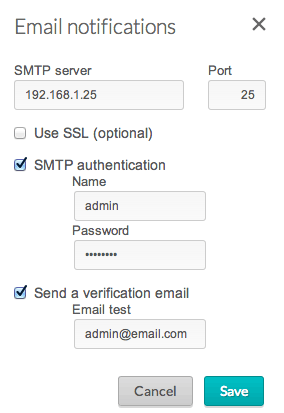
Email notifications update the administrator on NAS events (see the table Email notifications triggers below). To turn notifications on, click on the slider and complete the fields in the pop-up window.
- Enter the SMTP address for your email server. The NAS cannot send notifications without an email server. You can use an in-house SMTP server or third-party providers such as gmail, hotmail, etc.
- You have the option to enable SSL by checking its box.
- If your email server requires verification, check the box next to SMTP authentication to enter the username and password.
- Test the connection by checking the box next to Send a verification email.
Email notification triggers
The following events will trigger email notifications. Emails are sent to the address provided on the Users page.
| Event identifier | Description | Recipient |
|---|---|---|
| Capacity | The total available capacity is less than 10% | Administrator |
| Quota | The user has reached 90% of his storage quota | Administrator |
| Download | A download job has completed or a download job error has occurred | Administrator |
| Backup | A backup job has: started, ended, been cancelled, or failed | Administrator |
| Test email | Email sent as a test on the Support page | Administrator |
| RAID | Creation of a RAID volume; unprotected volume due to disk failure; broken RAID | Administrator |
| Fan | The fan has stopped | Administrator |
| Temperature | The product has remained at maximum temperature for at least one minute | Administrator |
| Password recovery | A user has recovered his/her password | Administrator or user, depending on who made the request |
Recent activity (logs)
The Logs section will list events, such as RAID changes, downloads, warnings, and much more. Logs are important when troubleshooting with Seagate technical support.
To purge all events from the log list, choose Clear logs.
Choose Download System Log for a text file of the logs.