Was this content helpful?
How could we make this article more helpful?
RAID Levels
RAID levels differ in performance, usable storage capacity, and data‑protection capabilities, depending on the selected configuration and the number of drives in the array. Review the summaries for each RAID level before selecting a configuration for your device.
For RAID configuration instructions, see the Configure and Manage Arrays.
Minimum/Maximum Drives: 8big Pro 5
| RAID level | Min. drives | Max. drives | Notes |
|---|---|---|---|
| RAID 0 | 2 | 8 | |
| RAID 1 | 2 | 2 | Only two drives are supported for a RAID 1 array. |
| RAID 5 | 5 | 8 | A minimum of five drives are required to allow for background initialisation as an option.* |
| RAID 6 | 7 | 8 | A minimum of seven drives are required to allow for background initialisation as an option.* |
| RAID 10 | 4 | 8 | Requires an even number of drives (four, six, or eight). |
| RAID 50 | 6 | 8 | Requires an even number of drives (six or eight). Can only be created via foreground initialisation. * |
| RAID 60 | 8 | 8 | Can only be created via foreground initialisation. * |
| * To better understand the difference between a background initialisation and a foreground initialisation, see Create an array. | |||
Standard RAID levels
RAID 0
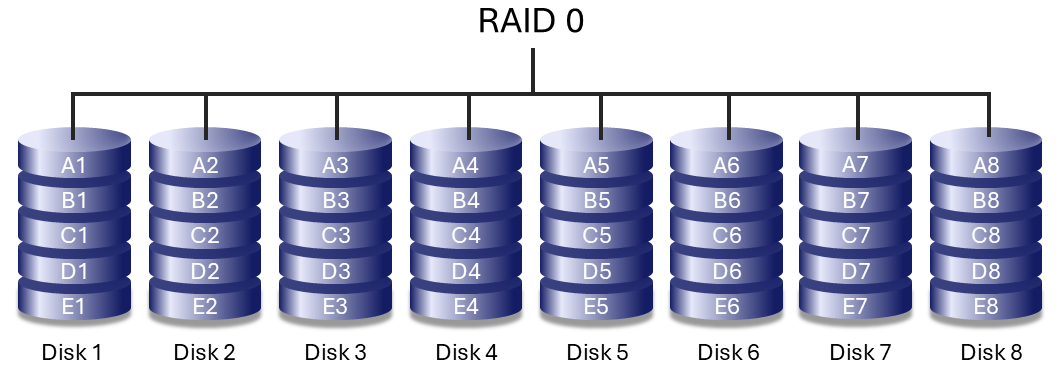
RAID 0 provides the highest sequential performance by writing data across all drives in the array (striping). The usable storage capacity equals the combined capacity of all drives.
RAID 0 does not provide data protection. If a single drive fails, all data in the array is lost. RAID 0 is best suited for temporary or non‑critical data where performance is the primary requirement and data can be restored from another source.
RAID 1
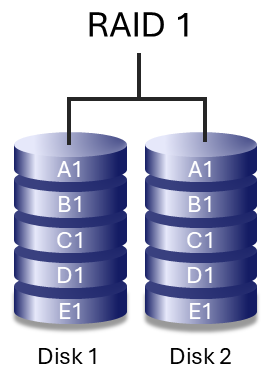
RAID 1 mirrors data between two drives, providing enhanced data protection. If one drive fails, data remains available on the remaining drive.
Because all data is written to both drives, usable storage capacity is reduced by 50%. Write performance is lower than RAID 0, due to the time it takes to write data multiple times. RAID 1 is supported only with two drives and cannot be expanded.
RAID 5
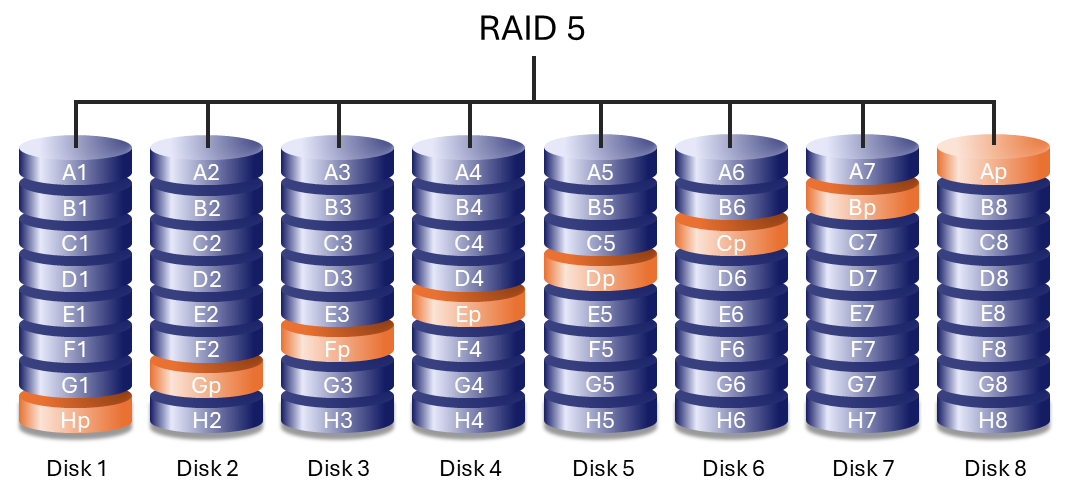
RAID 5 writes data across all drives in the array and distributes parity information among them. If one drive fails, the array continues to operate and the missing data can be rebuilt onto a replacement drive.
If a second drive fails before the rebuild process completes, data in the array is lost.
RAID 5 performance can approach that of RAID 0 while providing protection against a single drive failure. Usable capacity is calculated by multiplying the capacity of the smallest drive by the total number of drives in the array, minus one:
Smallest drive capacity × (Total number of drives − 1)
Example 1: An array is assigned five 8 TB drives for a total of 40 TB. The equation is:
8 TB x 4 = 32 TB
Example 2: An array is assigned four 16 TB drives and one 24 TB drive for a total of 88 TB. The equation is:
16 TB x 4 = 64 TB
RAID 6
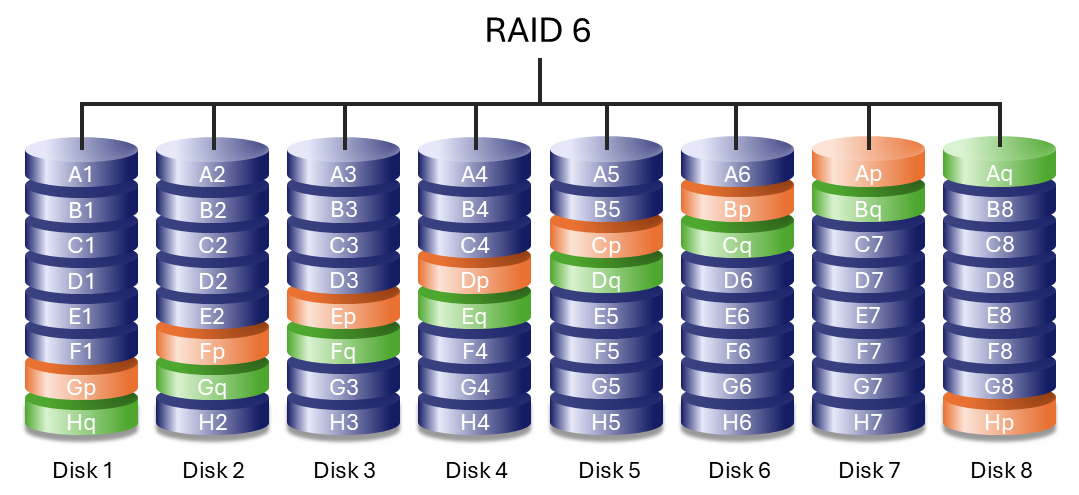
RAID 6 writes data across all drives in the array and stores two sets of distributed parity information. This configuration allows the array to withstand the failure of up to two drives without data loss.
Rebuilding data after a drive failure is slower than RAID 5 due to the additional parity calculations, but RAID 6 provides significantly greater protection for large‑capacity arrays.
Nested RAID levels
RAID 10
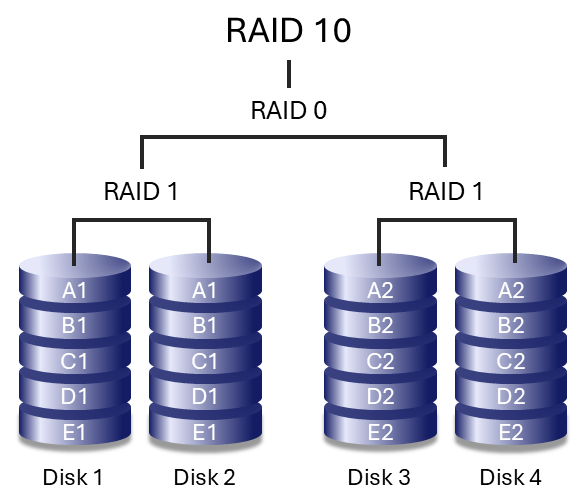
RAID 10 combines the data protection of RAID 1 with the performance benefits of RAID 0. The array is composed of mirrored pairs of drives that are then striped together.
RAID 10 can tolerate the failure of one drive in each mirrored pair, as long as both drives in the same mirror do not fail simultaneously. This configuration provides strong data protection and high performance, particularly for workloads that involve frequent access to many small files and benefit from higher input/output operations per second (IOPS).
RAID 50
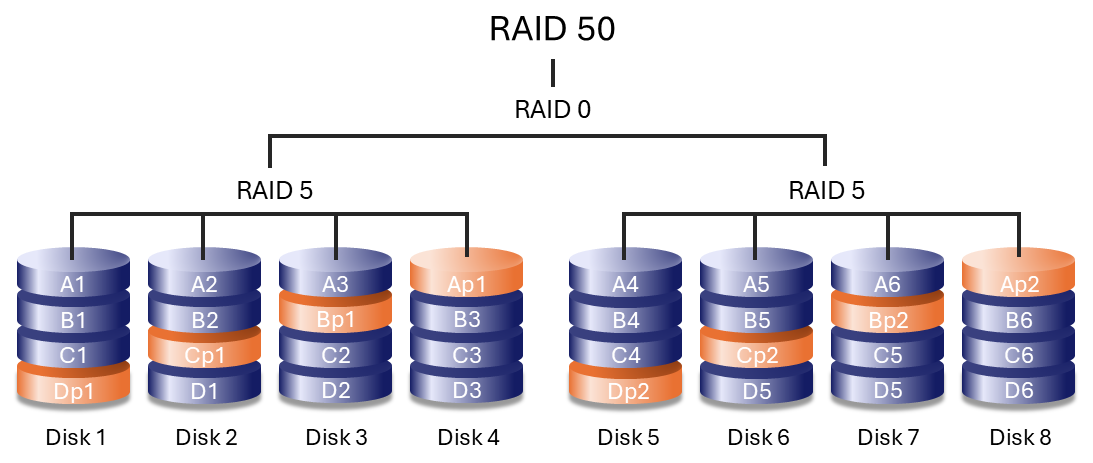
RAID 50 combines RAID 0 striping with RAID 5 parity by striping data across multiple RAID 5 groups. This configuration improves write performance compared to RAID 5 while offering greater fault tolerance than a single RAID level.
A minimum of six drives is required. Arrays with a large number of drives may take longer to initialise and rebuild due to increased capacity.
RAID 50 can only be created using foreground initialisation. During foreground initialisation, your device must be disconnected from the host computer. For details, see the Create an array.
RAID 60
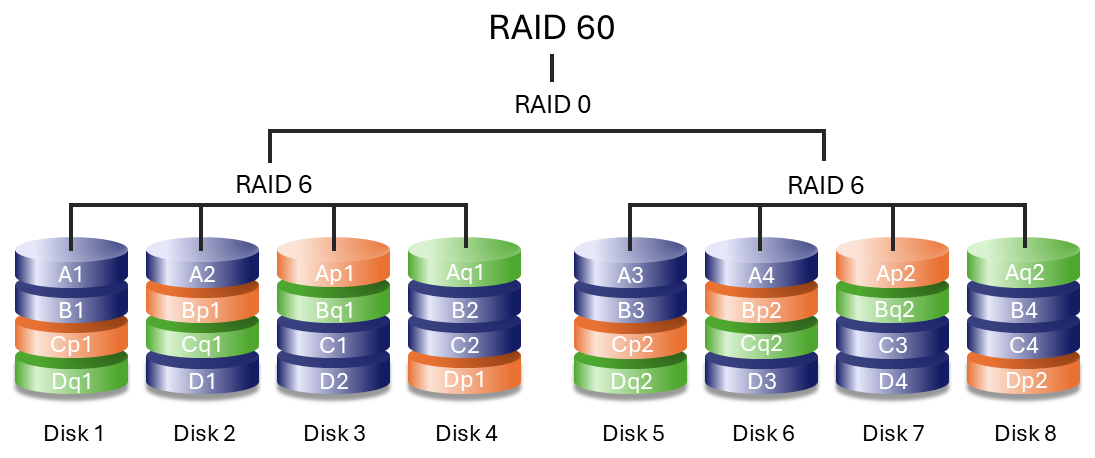
RAID 60 combines RAID 0 striping with RAID 6 double parity by striping data across multiple RAID 6 groups. This configuration offers improved performance compared to RAID 6 while providing high fault tolerance.
A minimum of eight drives is required. Because RAID 60 arrays use a large number of drives, initialisation and rebuild operations take longer than with standard RAID levels.
RAID 60 can only be created using foreground initialisation. During foreground initialisation, your device must be disconnected from the host computer. For details, see the Create an array.
RAID + Spare
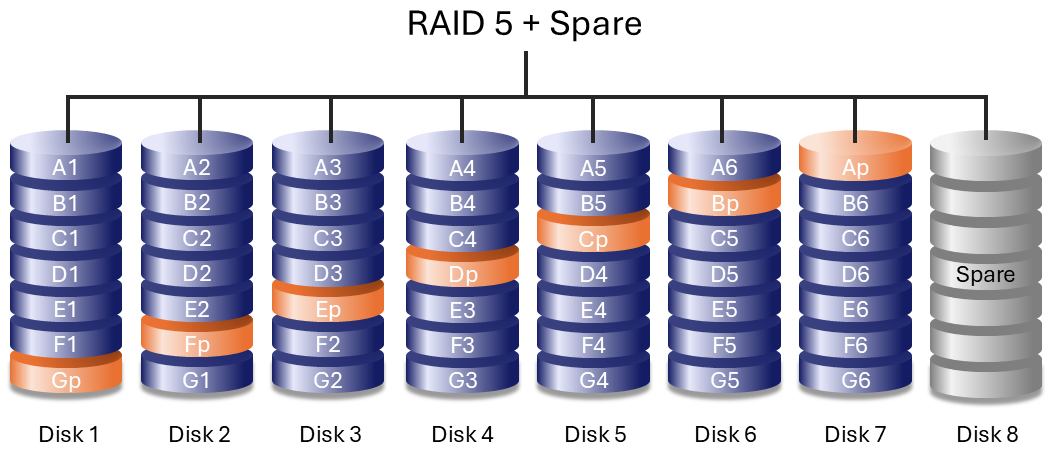
A RAID + Spare configuration includes a reserved drive that automatically replaces a failed drive. When a drive fails, data synchronisation to the spare begins immediately, reducing the time the array operates in a degraded state. Arrays with redundancy that do not include a spare must wait for a replacement drive to start before synchronisation.
- The spare drive is not available for data storage during normal operation (all drives in the array are in a healthy state).
- After synchronisation is complete, the spare acts as a member of the array until the failed drive is replaced by a new drive. Upon inserting the new drive, the RAID controller performs a copyback operation in which the data is copied to the replacement drive. The spare drive then resumes its role as the spare.
- Both dedicated and global spare drives are supported. A dedicated spare is a drive assigned to take over for a failed drive so the device's system can immediately rebuild the array to maintain data redundancy. A global spare is a drive that can be used by any array on the device.
For more details, see Assign a spare drive.
Drive failures and synchronising a spare drive
For RAID + Spare arrays, data remains intact when the minimum number of redundant drives fail. However, if an additional drive fails before or during data synchronisation with the spare, data in the array is lost. See the examples below.
- RAIDs 1 and 5 — One drive has failed and the array synchronises with the spare drive. If a second drive in the RAID 1 or RAID 5 array fails before synchronisation is complete, all data in the array is lost.
- RAID 6 — Two drives have failed and the array synchronises the first failed drive with the spare. If a third drive in the RAID 6 array fails before synchronisation is complete, all data in the array is lost.
- Nested RAID — Nested RAID levels have greater fault tolerances depending upon which of the nested RAID arrays have drives that fail.
- RAIDs 10 and 50 — Each of the nested arrays can lose one drive. If one of the two nested arrays loses two drives before or during the synchronisation, data is lost.
- RAID 60 — Each of the nested arrays can lose two drives. If one of the two nested arrays loses three drives before or during the synchronisation, data is lost.