Apakah artikel ini bermanfaat?
Apa yang dapat kami lakukan untuk meningkatkan manfaat artikel ini?
System LEDs
The Seagate WSS NAS 2-Bay | 4-Bay | 6-Bay features LEDs that provide information on the system's status. Review the illustrations below for the LED locations on the chassis.
WSS NAS LEDs
Status and drive LEDs
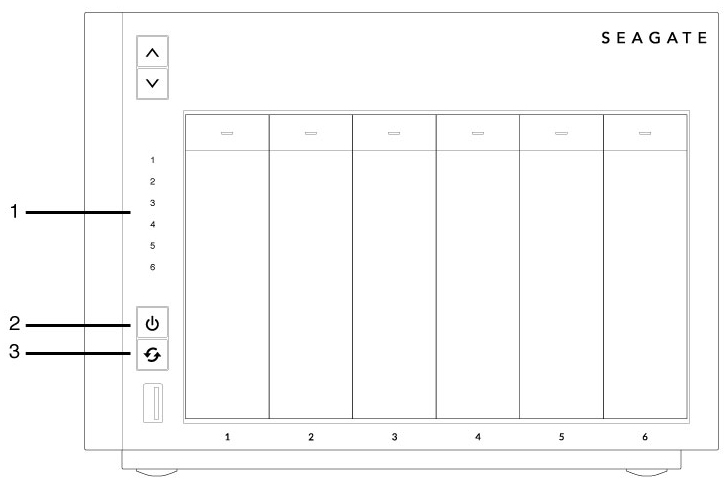
- Hard drives (The number of hard drive LEDs differs by model.)
- Status (Power button)
- Function
WSS NAS Ethernet LEDs
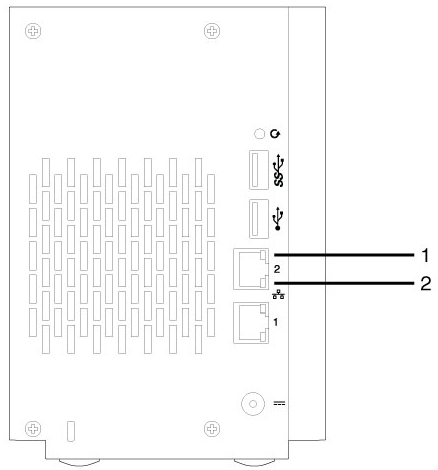
- Activity
- Speed
LED behavior
Status LED
The list of colors below helps you identify the general status of your NAS.
| Color | Status |
|---|---|
| Solid white | Ready |
| Blinking white | Startup; recovery |
| Alternating red and white | Fan error |
| Blinking red | Warning or notice |
| Solid red | Error; no system disk |
Hard drive LEDs
The list of colors below helps you identify the status of the NAS's hard drive:
| Color | Status |
|---|---|
| Solid white | Ready |
| Blinking white (steady) | RAID rebuild |
| Blinking white (intermittent) | Activity |
| Alternating red and white | SMART errors; high temperature; failed redundancy |
| Blinking red | Error |
| Solid red | Disk not recognized |
Function LED
The NAS's function LED is only active during a recovery:
| Color | Status |
|---|---|
| Solid white | Ready for recovery |
| Blinking white | Performing recovery |
Ethernet activity LED
The NAS's Ethernet activity LED indicates access to the device:
| Color | Status |
|---|---|
| Steady amber | No activity |
| Blinking amber | Activity; Wake on LAN is enabled |
Ethernet speed LED
The NAS Ethernet speed LED indicates the speed of your network connection:
| Color | Status |
|---|---|
| Off | 10Mb/s |
| Amber | 100Mb/s |
| Green | 1Gb/s |