Was this content helpful?
How could we make this article more helpful?
LED Indicator and Cables
Status light information
Your hard drive features a status light that provides general information about the product. Refer to the table below for details.
| Light behavior | Status |
| On and steady | Drive is on |
| Flickering | Data access |
| Off | Drive is off |
Thunderbolt 3 (USB-C)

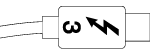
USB is a serial input/output technology for connecting peripheral devices to a computer. USB-C is the latest implementation of this standard and it provides higher bandwidth and new power management features. Further, USB-C ports that feature the thunderbolt icon include support for Thunderbolt 3 devices.
Thunderbolt 3 can attain up to 40Gb/s as opposed to USB 2.0's 480Mb/s, USB 3.0's 5Gb/s and Thunderbolt 2's 20Gb/s.
Thunderbolt 3 (USB-C) cable
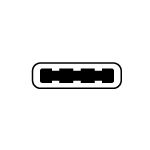
Use the included Thunderbolt 3 (USB-C) cable to ensure maximum data transfer performance when used with compatible ports. Connecting your product is easy since the Thunderbolt 3 (USB-C) cable is identical on both ends.
| Connector face | Cable end |
 |
|