Was this content helpful?
How could we make this article more helpful?
Status LEDs
LEDs provide information on the status of the system and each hard drive.
LED locations
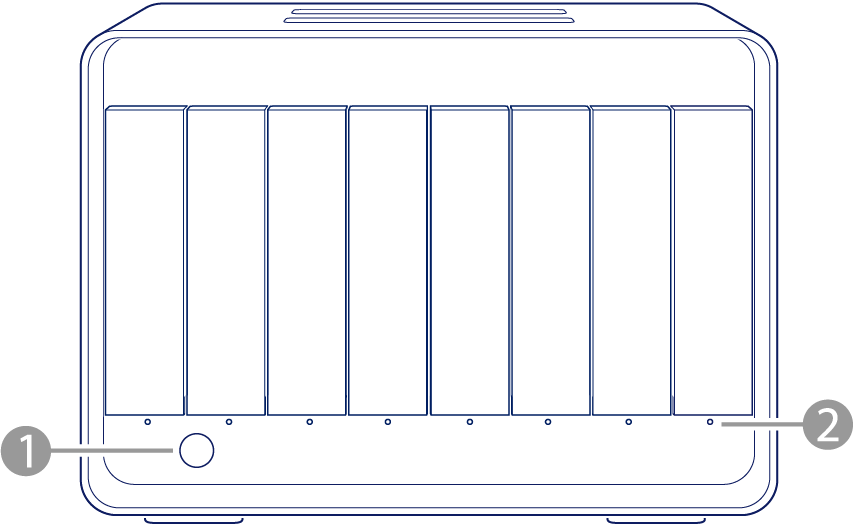
- System LED — Indicates system status.
- Drive LEDs — Indicate hard drive activity and health.
LEDs for this device can be brightened or dimmed using LaCie RAID Manager. See the RAID Manager User Manual for details.
System LED
| Colour | Pattern | System status |
|---|---|---|
| Off | Off | Device is powered off |
| Blue (2 sec)/Off (2 sec) | Slow Blink | Starting |
| Blue | Steady | Idling |
| Blue/Dark Blue | Breathe | Background initialisation |
| Green/Off | Blink | Foreground initialisation |
| Light Blue | Steady | Foreground initialisation complete |
| Purple/Blue | Breathe | RAID rebuilding |
| Purple | Steady | The array's performance is partially degraded. The array is operating with reduced redundancy but can still tolerate another drive failure. This state typically occurs in a RAID 6 configuration after one drive has failed. Performance may be reduced, but data remains protected. |
| Magenta | Steady | The array's performance is degraded. The array has lost its redundancy and can no longer tolerate an additional drive failure. This state typically occurs in a RAID 5 configuration after one drive has failed, or in a RAID 6 configuration after two drive failures. Performance is reduced, and data is at risk until the failed drive is replaced and the array is rebuilt. |
| Orange | Steady | Warning temperature |
| Red/Off | Blink | Critical temperature |
| Red | Steady | Emergency temperature, fan not connected, or RAID broken |
Drive LEDs
| Colour | Pattern | Drive status |
|---|---|---|
| Off | Off | Drive not detected or drive starting |
| Blue | Steady | Idling |
| Blue (2 sec)/Off (2 sec) | Slow Blink | Drive detection in progress (normal operation) |
| Blue (100 ms)/Off (100 ms) | Fast Blink | Drive is being accessed (normal operation) |
| Blue (1 sec)/Off (2 sec) | Blink | Sector health scan in process |
| Blue/Dark Blue | Breathe | Background initialisation |
| Green/Off | Blink | Foreground initialisation |
| Light Blue | Steady | Foreground initialisation complete |
| Purple/Off | Blink | RAID rebuilding |
| Purple | Steady | The array's performance is partially degraded. The array is operating with reduced redundancy but can still tolerate another drive failure. This state typically occurs in a RAID 6 configuration after one drive has failed. Performance may be reduced, but data remains protected. Note: All drives in the partially degraded array show the same colour and pattern, even while being accessed. |
| Purple/Blue | Breathe | Drive is being accessed while the array's performance is partially degraded |
| Magenta | Steady | The array's performance is degraded. The array has lost its redundancy and can no longer tolerate an additional drive failure. This state typically occurs in a RAID 5 configuration after one drive has failed, or in a RAID 6 configuration after two drive failures. Performance is reduced, and data is at risk until any failed drives are replaced and the array is rebuilt. Note: All drives in the degraded array show the same colour and pattern, even while being accessed. |
| Magenta/Blue | Breathe | Drive is being accessed while the array's performance is degraded |
| Orange | Steady | RAID broken |
| Red | Steady | Emergency temperature or drive is faulty |