Was this content helpful?
How could we make this article more helpful?
System Overview
Specifications
Dimensions
| Dimension | Measurement |
|---|---|
| Length | 297 mm/11.693 in |
| Width | 232 mm/9.134 in |
| Height | 215 mm/8.465 in |
Weight
| Capacity | Measurement |
|---|---|
| 32 TB | 13.044 kg / 28.697 lb |
| 64 TB | 13.612 kg / 29.946 lb |
| 128 TB | 13.324 kg / 29.313 lb |
| 192 TB | 13.324 kg / 29.313 lb |
| 240 TB | 13.420 kg / 29.524 lb |
| 256 TB | 13.420 kg / 29.524 lb |
Temperature ranges
| Ambient environment | Temperature range |
|---|---|
| Standard (operating) | +5ºC to +35ºC |
| Storage (non-operating) | -20ºC to +60ºC |
Humidity
| Environment | Humidity range |
|---|---|
| Standard (operating) | 10% to 60% non-condensing |
| Storage (non-operating) | 5% to 85% non-condensing |
Electrical
Power rating: 100–240 VAC, 50/60 Hz, 6.5 A, up to 450 W (total)
For more details, see Connectivity and Power Delivery.
Views
Front
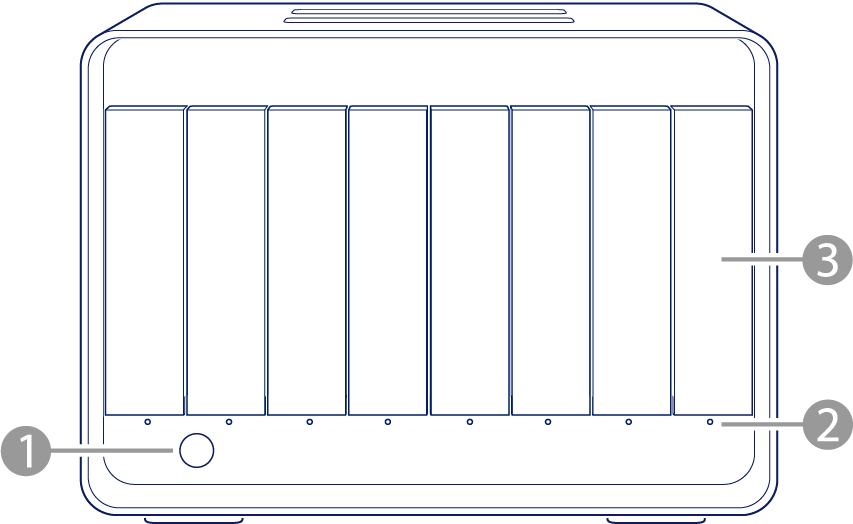
- Status LED — Indicates system status. See System LEDs.
- Drive status LEDs — Indicate hard drive activity and health. See System LEDs.
- Drive bays — Drawers can be removed from their bays to replace hard drives. 8big Pro5 hard drives are hot-swappable. See Hard Drive Maintenance.
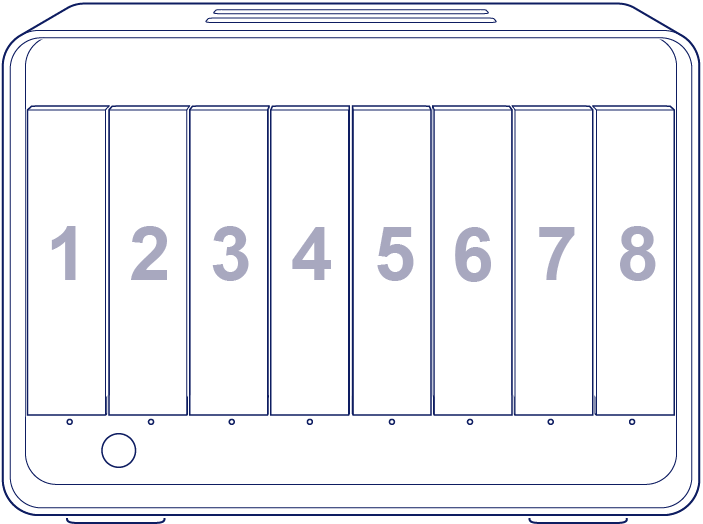
The numbers below indicate how drives are identified by LaCie RAID Manager, the application used for managing 8big Pro5.
Back
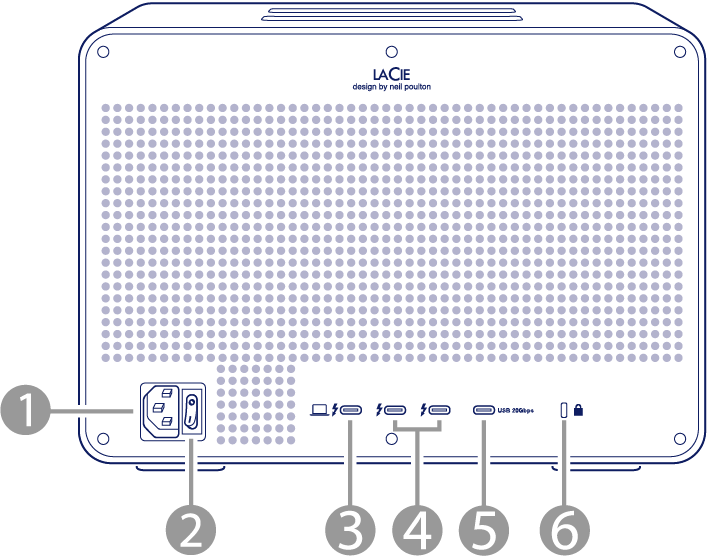
- Power input — Connect the power cable to the power input port. Only use the power cable included with 8big Pro5. See Connect LaCie 8big Pro5.
- Power switch — Use the switch to power 8big Pro5 on/off. See Operation.
- Thunderbolt 5 host port — Use the provided Thunderbolt 5 cable to connect to a compatible port on your host computer. Note that transfer rates vary by the connection type. See Connect LaCie 8big Pro5.
- Thunderbolt 5 ports — Use the Thunderbolt 5 downstream ports to connect external storage devices and displays. The downstream ports also deliver up to 30 W of power to compatible devices. See Connectivity and Power Delivery.
- USB 20 Gbps port — Use the USB 20 Gbps downstream port to connect external storage devices. The port also delivers up to 15 W of power to compatible devices.
- Anti-theft lock port: Use this port to physically lock 8big Pro5 to a desk or rack.
Storage management
Use LaCie RAID Manager to configure RAID level and manage storage. See the instructions in the RAID Manager User Manual.