- ASEAN (English)
- Australia/New Zealand (English)
- Belgique (Français)
- België (Nederlands)
- Brasil (Português)
- Canada (English)
- Canada (Français)
- Deutschland (Deutsch)
- España (Español)
- France (Français)
- India (English)
- Indonesia (Indonesian)
- Italia (Italiano)
- Latinoamérica (Español)
- Middle East/North Africa (English)
- Nederland (Nederlands)
- Polska (Polski)
- Portugal (Português)
- Singapore (English)
- Türkiye (Türkçe)
- United Kingdom (English)
- United States (English)
- 中国 (简体中文)
- 台灣 (繁體中文)
- 日本 (日本語)
- 대한민국 (한국어)
- Home /
- Lyve Mobile Rackmount Receiver /
- Welcome
Was this content helpful?
How could we make this article more helpful?
OPEN MENU CLOSE MENU
- Welcome
- Setup Requirements
- Rackmount Kit
-
Rack Assembly
- Step 1 - Attach M4 rack screws to the front rails
- Step 2 - Attach M4 rack screws to the back rails
- Step 3 - Attach cage nuts to rack
- Step 4 - Attach the front rails to the back rails
- Step 5 - Attach the rails to the front of the rack
- Step 6 - Attach the back rails to the back of the rack
- Step 7 - Tighten rail attachments
- Step 8 - Install Lyve Mobile Rackmount Receiver
- Recommended clearance
- Freestanding Latch Assembly
- Data Connections
- Power Connections
- Device Connections
- FC Network Setup for Windows
- FC Network Setup for Linux (RHEL/CentOS 8)
- FC Network Setup for Linux (Debian/Ubuntu)
- iSCSI Network Setup for Windows
- iSCSI Network Setup for Linux (RHEL/CentOS 8)
- iSCSI Network Setup for Linux (Ubuntu/Debian)
- SAS Network Setup for Windows
- SAS Network Setup for Linux (RHEL/CentOS)
- SAS Network Setup for Linux (Debian/Ubuntu)
- Regulatory Compliance
Welcome
Seagate® Lyve™ Mobile Rackmount Receiver facilitates quick ingestion of shuttle content directly into a network center.
Box content
- Lyve Mobile Rackmount Receiver
- 1.8 m power cord (x4: US, UK, EU, AU/NZ)
- Rail kit accessory box
- Front latch kit accessory box
- Power cord zip tie/lock (x2)
- Quick Start Guide
Specifications
Dimensions
| Side | Dimensions (in/mm) |
| Length | 19 in/482.6 mm |
| Width | 4.638 in/117.8 mm |
| Depth | 24.598 in/624.78 mm |
Weight
| Part | Weight (lb/kg) |
| Mobile Rackmount Receiver | 47.52 lb/21.6 kg |
Electrical
Power adapter, AC/DC base in:100~240V/9.4A, out:12V/65A
Views
Front view
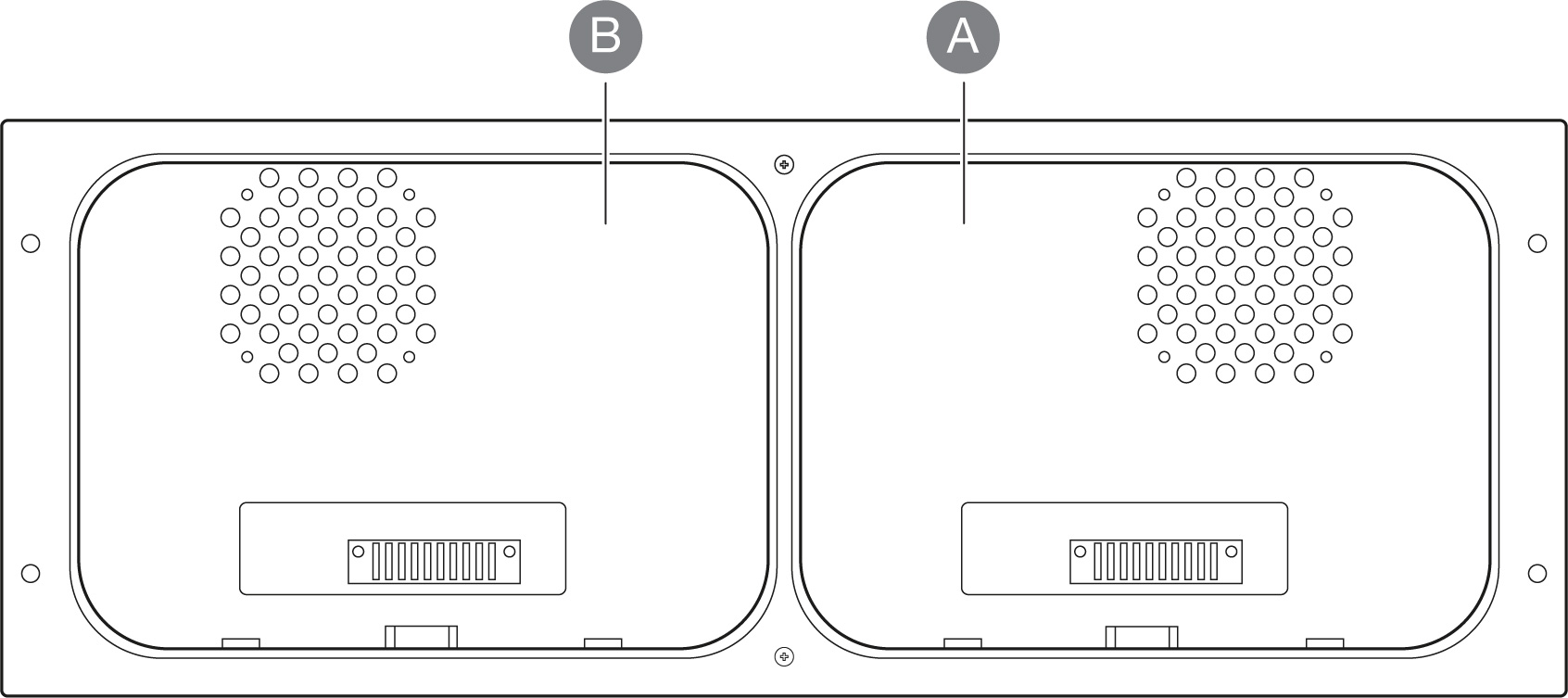
| Key | I/O | Description |
|---|---|---|
| A | Slot A | Slot for compatible device. |
| B | Slot B | Slot for compatible device. |
Back view
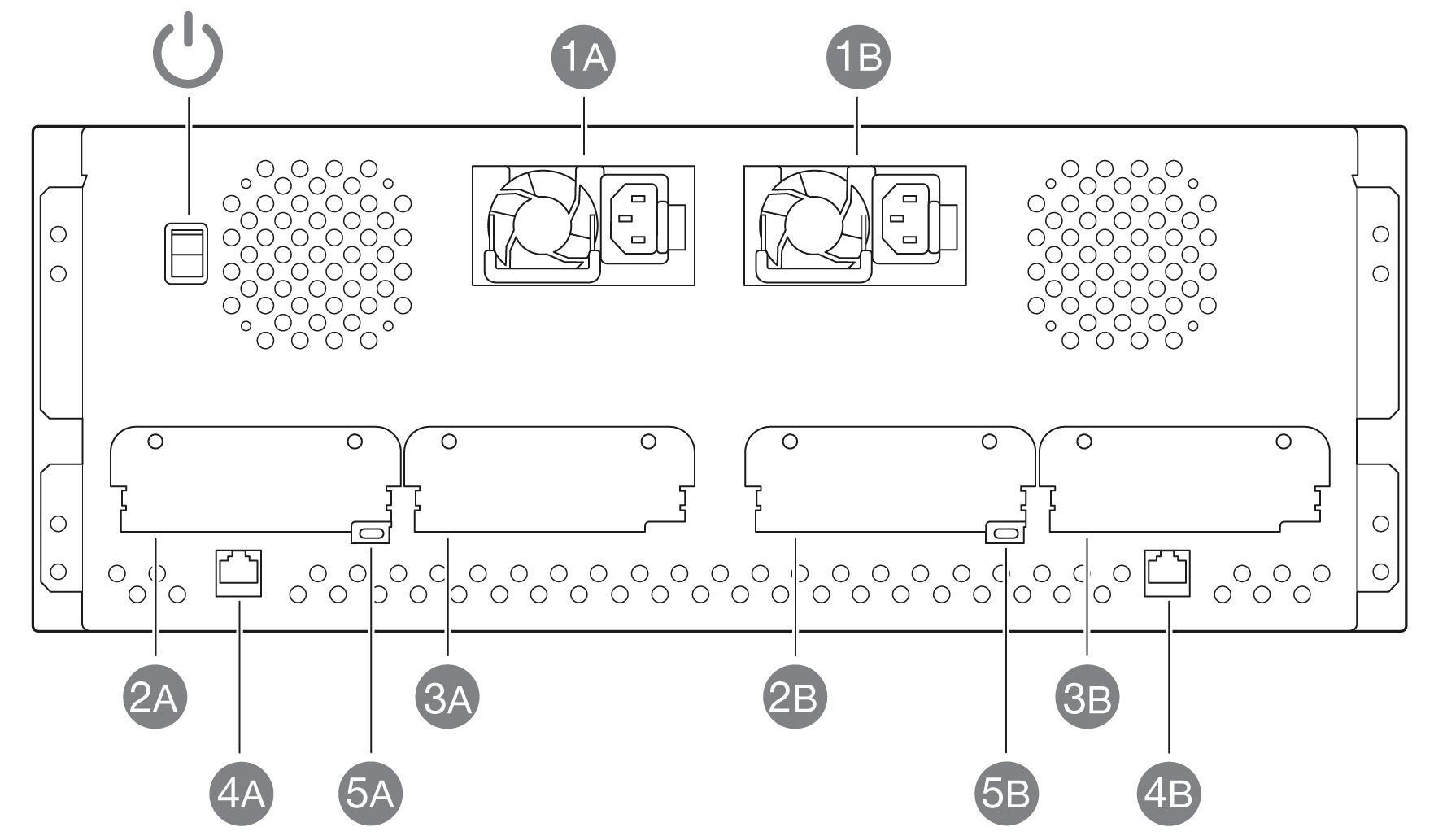
| Key | I/O | Description |
|---|---|---|
 | Power switch | Turn power on/off. |
| 1A 1B | Power input - A Power input - B | Redundant power supply units. Each unit on its own is capable of delivering power to Lyve Mobile Rackmount Receiver and installed devices. See Power Connections. |
| 2A | Slot A / Left | Data connection for device in slot A. See Data Connections. |
| 3A | Slot A / Right | Host interface for future expansion. Not available with all models. |
| 4A | Ethernet management port - A | Ethernet connection for device in slot A. Not to be used for data transfers. |
| 5A | CLI management port - A | Command-line interface port for device in slot A. For service only. Not to be used for data transfers. |
| 2B | Slot B / Left | Host interface for future expansion. Not available with all models. |
| 3B | Slot B / Right | Data connection for device in slot B. See Data Connections. |
| 4B | Ethernet management port - B | Ethernet connection for device in slot B. Not to be used for data transfers. |
| 5B | CLI management port - B | Command-line interface port for device in slot B. For service only. Not to be used for data transfers. |
Lyve Mobile Rackmount Receiver User Manual